7.3. Insertion sort
What would you do if you have a stack of phone bills from the past two years and you want to order by date? A fairly natural way to handle this is to look at the first two bills and put them in order. Then take the third bill and put it into the right position with respect to the first two, and so on. As you take each bill, you would add it to the sorted pile that you have already made. This simple approach is the inspiration for our first sorting algorithm, called Insertion Sort.
Insertion Sort iterates through a list of records.
For each iteration, the current record is inserted in turn at the
correct position within a sorted list composed of those records
already processed.
Given an array named data that stores \(n\) records,
one way to implement an insertion sort could be this.
template <class Comparable>
void insertion_sort(Comparable* data[], int n) {
  for (int i = 1; i < n; ++i) {
    for (int j = i; (j > 0) && (*data[j] < *data[j-1]); --j) {
      swap(data, j, j-1);
     }
   }
}
Insertion sort: growing the sorted prefix
Scene 1: Start with a sorted prefix of one item.
This sort is still \(O(n^{2})\), but works differently from the bubble sort and selection sort, since it always maintains a sorted subvector at the start of the container. Each new item is inserted into this sorted prefix, making it one item larger.
The outlined cells show the sorted prefix. Initially, it contains only 54. The remaining eight items have not yet been processed.

Text description
Array with 9 cells. From left to right: “54”, “26”, “93”, “17”, “77”, “31”, “44”, “55”, and “20”.
“54” is highlighted.
Scene 2: Pass 1: insert 26.
Since 26 is less than 54, shift 54 one position to the right and insert 26 at the start. The sorted prefix now contains two items.

Text description
Array with 9 cells. From left to right: “26”, “54”, “93”, “17”, “77”, “31”, “44”, “55”, and “20”.
“26” and “54” are highlighted.
Scene 3: Pass 2: insert 93.
Since 93 is greater than 54, it is already in the correct position. No shifts are needed. The sorted prefix now contains three items.

Text description
Array with 9 cells. From left to right: “26”, “54”, “93”, “17”, “77”, “31”, “44”, “55”, and “20”.
“26”, “54”, and “93” are highlighted.
Scene 4: Pass 3: insert 17.
Shift 93, 54, and 26 one position to the right, then insert 17 at the start. The sorted prefix now contains four items.

Text description
Array with 9 cells. From left to right: “17”, “26”, “54”, “93”, “77”, “31”, “44”, “55”, and “20”.
“17”, “26”, “54”, and “93” are highlighted.
Scene 5: Pass 4: insert 77.
Shift 93 one position to the right. Since 54 is less than 77, insert 77 between 54 and 93. The sorted prefix now contains five items.

Text description
Array with 9 cells. From left to right: “17”, “26”, “54”, “77”, “93”, “31”, “44”, “55”, and “20”.
“17”, “26”, “54”, “77”, and “93” are highlighted.
Scene 6: Pass 5: insert 31.
Shift 93, 77, and 54 one position to the right. Stop at 26 and insert 31 immediately after it. The sorted prefix now contains six items.

Text description
Array with 9 cells. From left to right: “17”, “26”, “31”, “54”, “77”, “93”, “44”, “55”, and “20”.
“17”, “26”, “31”, “54”, “77”, and “93” are highlighted.
Scene 7: Pass 6: insert 44.
Shift 93, 77, and 54 one position to the right, then insert 44 between 31 and 54. The sorted prefix now contains seven items.

Text description
Array with 9 cells. From left to right: “17”, “26”, “31”, “44”, “54”, “77”, “93”, “55”, and “20”.
“17”, “26”, “31”, “44”, “54”, “77”, and “93” are highlighted.
Scene 8: Pass 7: insert 55.
Shift 93 and 77 one position to the right, then insert 55 between 54 and 77. The sorted prefix now contains eight items.

Text description
Array with 9 cells. From left to right: “17”, “26”, “31”, “44”, “54”, “55”, “77”, “93”, and “20”.
“17”, “26”, “31”, “44”, “54”, “55”, “77”, and “93” are highlighted.
Scene 9: Pass 8: insert 20; the array is sorted.
Shift every value greater than 20 one position to the right. Stop at 17 and insert 20 immediately after it. All nine items now belong to the sorted prefix, so the sort is complete.

Text description
Array with 9 cells. From left to right: “17”, “20”, “26”, “31”, “44”, “54”, “55”, “77”, and “93”.
“17”, “20”, “26”, “31”, “44”, “54”, “55”, “77”, and “93” are highlighted.
We begin by assuming that a vector with one item (position \(0\)) is already sorted. On each pass, one for each item 1 through \(n-1\), the current item is checked against those in the already sorted subvector. As we look back into the already sorted subvector, we shift those items that are greater to the right. When we reach a smaller item or the end of the subvector, the current item can be inserted.
Insertion sort: the fifth pass in detail
Scene 1: Save 31 before shifting any items.
The fifth pass starts with a sorted prefix of five items: 17, 26, 54, 77, and 93. The next item, 31, must be inserted into that prefix. Save a copy of 31 so that shifting larger values cannot overwrite it.
The separate cell holds the saved value. In the following scenes, an empty cell marks the position available for insertion.

Text description
Array with 9 cells. From left to right: “17”, “26”, “54”, “77”, “93”, “31”, “44”, “55”, and “20”.
“31” is highlighted.
Saved value

Text description
Array with 1 cells. From left to right: “31”.
Scene 2: Compare 31 with 93.
The saved value is 31. Since 93 is greater than 31, shift 93 one position to the right, into the empty cell. The available insertion position moves one cell to the left.

Text description
Array with 9 cells. From left to right: “17”, “26”, “54”, “77”, “93”, an unused cell, “44”, “55”, and “20”.
“93” and an unused cell are highlighted.
Saved value
Text description
Array with 1 cells. From left to right: “31”.
Scene 3: Compare 31 with 77.
The previous shift placed 93 in the sixth cell. Since 77 is also greater than 31, shift 77 one position to the right into the empty cell.

Text description
Array with 9 cells. From left to right: “17”, “26”, “54”, “77”, an unused cell, “93”, “44”, “55”, and “20”.
“77” and an unused cell are highlighted.
Saved value
Text description
Array with 1 cells. From left to right: “31”.
Scene 4: Compare 31 with 54.
The previous shift placed 77 immediately before 93. Since 54 is greater than 31, shift 54 one position to the right into the empty cell.

Text description
Array with 9 cells. From left to right: “17”, “26”, “54”, an unused cell, “77”, “93”, “44”, “55”, and “20”.
“54” and an unused cell are highlighted.
Saved value
Text description
Array with 1 cells. From left to right: “31”.
Scene 5: Compare 31 with 26; stop shifting.
The previous shift placed 54 immediately before 77. Since 26 is less than 31, no more shifts are needed. Insert the saved value, 31, into the empty cell between 26 and 54.

Text description
Array with 9 cells. From left to right: “17”, “26”, an unused cell, “54”, “77”, “93”, “44”, “55”, and “20”.
“26” and an unused cell are highlighted.
Saved value
Text description
Array with 1 cells. From left to right: “31”.
Scene 6: The fifth pass is complete; six items form the sorted prefix.
Four comparisons and three shifts made room for 31. Inserting it after 26 extends the sorted prefix to six items. The outlined cells are sorted; 44, 55, and 20 still need to be inserted on later passes.
Text description
Array with 9 cells. From left to right: “17”, “26”, “31”, “54”, “77”, “93”, “44”, “55”, and “20”.
“17”, “26”, “31”, “54”, “77”, and “93” are highlighted.
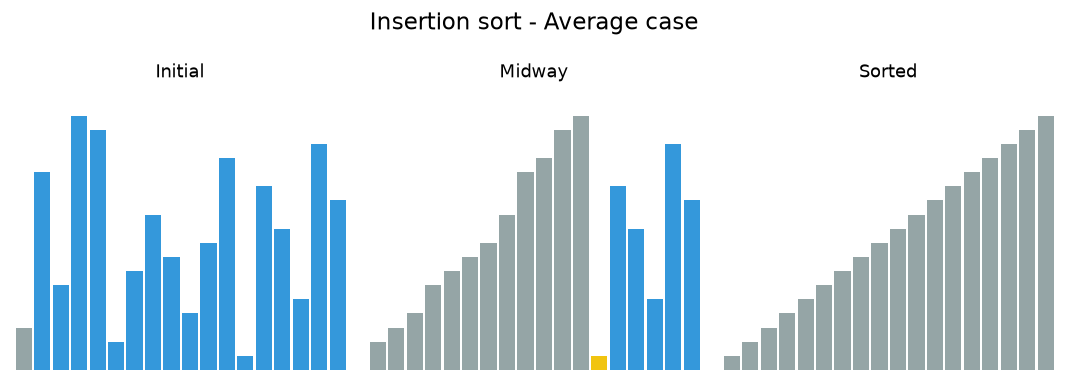
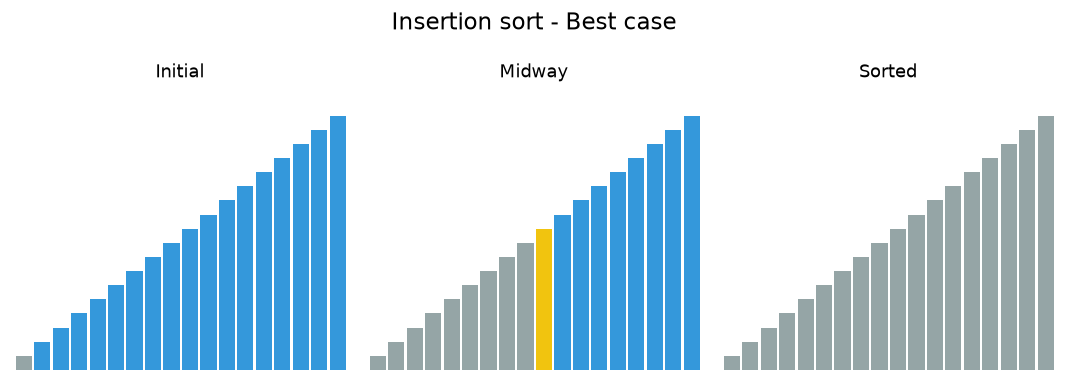
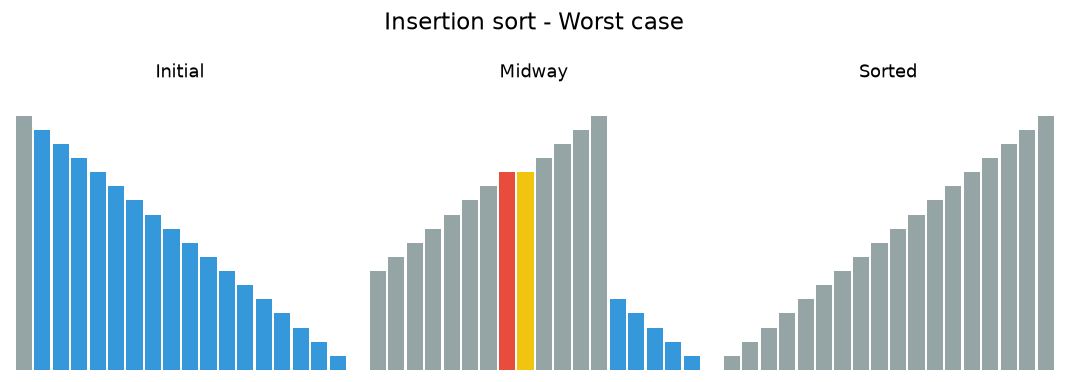
In the following animations, yellow marks the value being inserted, red marks a value being shifted, and gray marks the sorted prefix.
7.3.1. Insertion sort analysis
Insertion Sort
The implementation of insertion_sort
(Run It) shows that
there are again \(n-1\) passes to sort n items. The iteration
starts at position 1 and moves through position \(n-1\), as these
are the items that need to be inserted back into the sorted subvectors.
Line 8 performs the shift operation that moves a value up one position
in the vector, making room behind it for the insertion.
Remember that this
is not a complete exchange as was performed in the previous algorithms.
The maximum number of comparisons for an insertion sort is the sum of the first \(n-1\) integers. Again, this is \(O(n^{2})\). However, in the best case, only one comparison needs to be done on each pass. This would be the case for an already sorted vector.
One note about shifting versus exchanging is also important. In general, a shift operation requires approximately a third of the processing work of an exchange since only one assignment is performed. In benchmark studies, insertion sort will show very good performance.
Run It
 1#include <iostream>
 2#include <vector>
 3using std::vector;
 4
 5vector<int> insertion_sort(vector<int> data) {
 6  for (unsigned int index=1; index<data.size(); ++index) {
 7    int currentvalue = data[index];
 8    int position = index;
 9
10    while (position>0 && data[position-1]>currentvalue) {
11      data[position] = data[position-1];
12      --position;
13    }
14    data[position] = currentvalue;
15  }
16  return data;
17}
18
19int main() {
20  vector<int> data = {54, 26, 93, 17, 77, 31, 44, 55, 20};
21  for (const auto& value: insertion_sort(data)) {
22    std::cout << value << ' ';
23  }
24  std::cout << '\n';
25  return 0;
26}
Note
If you have not examined the previous you should. Many job interviews involve a 'whiteboard interview' that may ask you to write a bubble sort or an insertion sort.
I don't know why bubble sort in particular is such a popular question. The bubble sort:
is not particularly easy to memorize
is not an obvious solution to the sorting problem
performs rather badly - it's average performance is n-squared!
Exchange Sorts
If sorting does get asked and you can get past these points with a future employer, you might score some points with the following examples, which:
are far easier to memorize and explain: the actual sort is only 2 lines
even though still n-squared, is typically better in practice than bubble sort
demonstrates familiarity with the standard library.
 1#include <algorithm>
 2#include <iostream>
 3#include <iterator>
 4#include <numeric>
 5#include <vector>
 6#include <random>
 7
 8#define RandomAccessIterable typename
 9template <RandomAccessIterable It> void print(const It begin, const It end, const char* msg);
10template <RandomAccessIterable It> void selection_sort(It begin, It end);
11template <RandomAccessIterable It> void insertion_sort(It begin, It end);
12
13int main() {
14    std::vector<int> v(20);
15    std::iota(v.begin(), v.end(), -10);
16    auto generator = std::mt19937{std::random_device{}()};
17    std::shuffle(v.begin(), v.end(), generator);
18
19    print (v.begin(), v.end(), "before:         \t");
20    selection_sort(v.begin(), v.end());
21    print (v.begin(), v.end(), "selection sort: \t");
22
23    std::shuffle(v.begin(), v.end(), generator);
24    print (v.begin(), v.end(), "before:         \t");
25    insertion_sort(v.begin(), v.end());
26    print (v.begin(), v.end(), "insertion sort: \t");
27}
28
29template <RandomAccessIterable It>
30void selection_sort(It begin, It end) {
31    for (auto i = begin; i != end; ++i) {
32        std::iter_swap(i, std::min_element(i, end));
33        //print (begin, end, "\t");
34    }
35}
36
37template <RandomAccessIterable It>
38void insertion_sort(It begin, It end) {
39    for (auto i = begin; i != end; ++i) {
40        std::rotate(std::upper_bound(begin, i, *i), i, std::next(i));
41        //print (begin, end, "\t");
42    }
43}
44
45template <RandomAccessIterable It>
46void print(const It begin, const It end, const char* msg) {
47    // not very pretty
48    // avoids hardcoded ostream_iterator<int>
49    using os_iter = std::ostream_iterator<typename std::iterator_traits<It>::value_type>;
50
51    std::cout << msg;
52    std::copy(begin, end, os_iter(std::cout, " "));
53    std::cout << '\n';
54}
One nice feature of the selection sort implemented using
iter_swap and min_element is that the
min_element function takes a custom comparator.
This means that while the default behavior is to sort ascending since the default comparator is std::less any other binary predicate operation could be passed in.
C++20 Feature
If your compiler supports C++20 ranges, then you could use the ranges versions
of min_element and iter_swap and use a range-for loop.
Try This!
Modify the selection_sort template to take an optional comparison function
that changes the sort order.
Self Check
Q1
Suppose you have the following list of numbers to sort: [15, 5, 4, 18, 12, 19, 14, 10, 8, 20] which list represents the partially sorted list after three complete passes of insertion sort?