tb-pointer
The tb-pointer directive draws a labelled arrow identifying an element,
node, or boundary in a tb-scene. Its required argument is the pointer’s
object key. Each scene explicitly declares the target; labels such as
“current”, “cursor”, or “iterator” communicate its meaning in the lesson.
Synopsis
The general format of the tb-pointer directive is:
.. tb-pointer:: object-key
   :at: position-reference
   :optional parameter: value
The pointer body is empty. Place the declaration directly inside a scene.
:at: is required. Targets can be declared later in the same scene.
Options
- at
String. Required. Explicit target:values.slot[0],values.item[first],values.begin,values.end, orchain.node[head]. Slots are zero-based regardless of the array’sstart-index. Item references follow explicitly keyed items to their current positions. Array-style graphs also supportslot,begin, andend; their cells can be identified bynodereferences. Tree/list nodes with array content usetree.node[root].slot[0]. The containing array cannot be a pointer target; select a concrete cell.beginselects the first element. For an empty array, it coincides withend.endis a boundary past the last element, never an extra element. Usenonefor a pointer with no current target. Invisible graph targets retain their arrow position without exposing their value.- caption
String. Optional. Plain-text caption for this pointer occurrence.- class
StringorList. Optional. Space-separated CSS classes for this pointer. See Common options for details.- label
String. Optional. Default: the object key. Plain-text label beside the arrow.- name
String. Optional. Sphinx reference target for this particular pointer occurrence. See Common options for details.
Accessibility behavior
HTML places array pointer labels and arrows above horizontal arrays or beside
vertical arrays. An end pointer marks a separate boundary position.
Array-style graphs draw the end boundary as a dotted empty box separated from
real cells by a gap. The last real cell retains its rounded corners.
Pointers to graph nodes use the same arrows as local graph indicators.
Tree styles support multiple pointers and indicators, including shared targets.
Labels sharing a target are grouped, each with its own arrow. Tree pointers
use a gap between the target’s children, or a position below a leaf, so their
arrows do not cross other tree nodes. Document name values remain separate
from object keys.
Pointer descriptions identify the target, its current value, and its displayed
array index when applicable. Visual arrow symbols are hidden from assistive
technology; equivalent text descriptions remain available.
Use tb-array options range and range-label to mark a region
independently of a pointer. A scene or activity defines each pointer position;
pointers do not enforce traversal rules or evaluate expressions.
Fallback behavior
HTML without JavaScript retains pointer arrows and descriptions. Text and PDF
include the pointer’s position as prose; graph diagrams also include the arrow.
A pointer with :at: none is described as having no target.
Examples
Example 1: Point to a keyed item
Source
.. tb-scene::

   .. tb-pointer:: current
      :at: values.item[second]

   .. tb-array:: values

      first = 8
      second = 13
      third = 21
Rendered
Scene
| Index | 0 | 1 | 2 |
|---|---|---|---|
| Value | 8 | 13 | 21 |
Example 2: Mark the end boundary
Source
.. tb-scene::

   .. tb-array:: values
      :orientation: vertical

      3 5 7

   .. tb-pointer:: current
      :at: values.end
Rendered
Scene
| Index | Value | Pointer |
|---|---|---|
| 0 | 3 | |
| 1 | 5 | |
| 2 | 7 | |
| 3 | End |
For a complete traversal example, see tb-stack.
Example 3: Point to a graph node
network.node[b] draws a labelled arrow pointing directly to node b,
whose value is 13. This serves the same purpose as an array pointer:
identifying the current element visually. The list style arranges the graph
horizontally and places the pointer below its target node.
Source
.. tb-scene::

   .. tb-pointer:: current
      :at: network.node[b]

   .. tb-graph:: network
      :style: list

      a[8] -> b[13] -> c[21]
Rendered
Scene
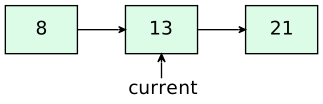
Text description
Linked list diagram with 3 visible nodes.
“8” points to “13”. “13” points to “21”.
Example 4: Track multiple tree positions
Pointers and local indicators can share a tree. Here head and previous
both point to the root, while current points to its left child. Each label
has its own arrow below its target.
Source
.. tb-scene::

   .. tb-graph:: tree
      :style: tree
      :indicators: head=root

      root[8] -left-> child[3]
      root -right-> other[12]
      child -right-> inserted[6]

   .. tb-pointer:: previous
      :at: tree.node[root]

   .. tb-pointer:: current
      :at: tree.node[child]
Rendered
Scene
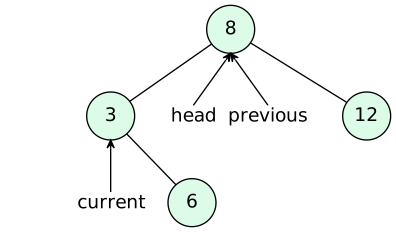
Text description
Tree diagram with 4 visible nodes.
The root is “8”.
“8” has left child “3” and right child “12”. “3” has right child “6”.
“12” and “6” are leaves.
Indicator “head” points to “8”.
Example 5: An array-style graph with begin and end
The first pointer selects a real cell. The second selects the dotted boundary
box beyond the last cell. Local tb-graph indicators accept the same
positions, such as :indicators: first=.begin finish=.end.
Source
.. tb-scene::

   .. tb-graph:: values
      :style: array

      a['a']
      b['b']
      c['c']

   .. tb-pointer:: first
      :at: values.begin

   .. tb-pointer:: finish
      :at: values.end
Rendered
Scene
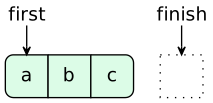
Text description
Array with 3 cells. From left to right: “a”, “b”, and “c”.