tb-stack
The tb-stack directive groups scenes in an ordered
collection. Readers advance using basic navigation buttons for the first,
previous, next, and last scene.
Declare every object and value present in each scene, including unchanged content. An omitted object is absent from that scene. Navigation can move backward or jump directly to the first or last scene without replaying steps.
Synopsis
The general format of the tb-stack directive is:
.. tb-stack::
   :optional parameter: value

   .. tb-scene::
      :optional parameter: value

      + --- Complete scene content ---
      |
      | prose, code, keyed arrays or graphs, and pointers
      |
      + ------------------------------

   .. tb-scene::

      + --- Next complete scene ---
      |
      | declare all content for this scene
      |
      + ---------------------------
The stack body contains one or more immediate tb-scene directives and
no other content. Scenes may be empty. Scenes and stacks cannot be nested
inside a scene, including through other containers.
Options
- caption
String. Optional. Plain-text caption displayed above the stack.- class
StringorList. Optional. Space-separated CSS classes for this stack. See Common options for details.- name
String. Optional. Sphinx reference target for this stack. See Common options for details.
Accessibility behavior
Navigation uses native buttons with Bootstrap chevron icons, accessible labels, and hover tooltips for first, previous, next, and last scene. Buttons are disabled at the corresponding endpoints. Keyboard users can Tab to the controls and activate them with Enter or Space. The scene count and caption are announced after navigation; the status is not a focus target. The current scene’s caption appears once, above the navigation buttons. If navigation disables the focused button, focus moves to an available previous or next button.
Use a scene’s :name: to link directly to it with a Sphinx reference.
Document links to named scenes or their content reveal the destination scene,
including when it belongs to another stack.
Each named occurrence retains its own Sphinx reference target. Object keys
are separate from document names; use different :name: values when naming
occurrences of the same object in different scenes.
Fallback behavior
HTML without JavaScript shows every scene in order and hides the navigation controls. Text and PDF show every scene, with captions, code, arrays, pointer positions, and graph descriptions or diagrams. Each scene is independently renderable. Reduced-motion preferences require no special settings because navigation changes scenes immediately.
Examples
Example 1: String joining and concatenation
This example unfolds a join expression into concatenation and its final value, using ordinary code blocks for each authored expression.
Source
.. tb-stack::

   .. tb-scene::

      Join the words with a space between them.

      .. code-block:: python

         words = ["Hello", "world"]
         message = " ".join(words)

   .. tb-scene::

      Substitute the list of words.

      .. code-block:: python

         message = " ".join(["Hello", "world"])

   .. tb-scene::

      Insert the separator between the two strings.

      .. code-block:: python

         message = "Hello" + " " + "world"

   .. tb-scene::

      The concatenated strings form the final message.

      .. code-block:: python

         message = "Hello world"
Rendered
Scene 1
Join the words with a space between them.
words = ["Hello", "world"]
message = " ".join(words)
Scene 2
Substitute the list of words.
message = " ".join(["Hello", "world"])
Scene 3
Insert the separator between the two strings.
message = "Hello" + " " + "world"
Scene 4
The concatenated strings form the final message.
message = "Hello world"
Example 2: Increment each array element
The pointer marks the current element. Each scene repeats the complete array
and pointer declaration. The final scene uses values.end to show that the
traversal has finished; the end position does not designate an element.
Source
.. tb-stack::
   :name: array-increment
   :caption: Add one to every element

   .. tb-scene::
      :caption: Start at the first element.

      .. tb-array:: values
         :highlight: values.slot[0]

         2 4 6

      .. tb-pointer:: current
         :at: values.begin

   .. tb-scene::
      :caption: Increment 2 to 3 and advance to the second element.

      .. tb-array:: values
         :highlight: values.slot[1]

         3 4 6

      .. tb-pointer:: current
         :at: values.slot[1]

   .. tb-scene::
      :caption: Increment 4 to 5 and advance to the third element.

      .. tb-array:: values
         :highlight: values.slot[2]

         3 5 6

      .. tb-pointer:: current
         :at: values.slot[2]

   .. tb-scene::
      :name: array-increment-done
      :caption: Increment 6 to 7. The pointer is now at the end.

      .. tb-array:: values

         3 5 7

      .. tb-pointer:: current
         :at: values.end
Rendered
Add one to every element
Scene 1: Start at the first element.
| Index | 0 | 1 | 2 |
|---|---|---|---|
| Value | 2 | 4 | 6 |
Scene 2: Increment 2 to 3 and advance to the second element.
| Index | 0 | 1 | 2 |
|---|---|---|---|
| Value | 3 | 4 | 6 |
Scene 3: Increment 4 to 5 and advance to the third element.
| Index | 0 | 1 | 2 |
|---|---|---|---|
| Value | 3 | 5 | 6 |
Scene 4: Increment 6 to 7. The pointer is now at the end.
| Index | 0 | 1 | 2 | End |
|---|---|---|---|---|
| Value | 3 | 5 | 7 | Past the end |
Example 2a: Increment graph array element
Very similar to the previous example, but using a tb-graph
Source
.. tb-stack::
   :name: array-graph-increment
   :caption: Add one to every element

   .. tb-scene::
      :caption: Start at the first element.

      .. tb-graph:: data
         :style: array
         :show-indices:
         :highlight: data.node[a]

         a['2']
         b['4']
         c['6']
         end[' '] {invisible}

      .. tb-pointer:: current
         :at: data.node[a]

   .. tb-scene::
      :caption: Increment 2 to 3 and advance to the second element.

      .. tb-graph:: data
         :style: array
         :show-indices:
         :highlight: data.node[b]

         a['3']
         b['4']
         c['6']
         end[' '] {invisible}

      .. tb-pointer:: current
         :at: data.node[b]

   .. tb-scene::
      :caption: Increment 4 to 5 and advance to the third element.

      .. tb-graph:: data
         :style: array
         :show-indices:
         :highlight: data.node[b]

         a['3']
         b['5']
         c['6']
         end[' '] {invisible}

      .. tb-pointer:: current
         :at: data.node[c]

   .. tb-scene::
      :name: array-increment-done
      :caption: Increment 6 to 7. The pointer is now at the end.

      .. tb-graph:: data
         :style: array
         :show-indices:

         a['3']
         b['5']
         c['7']
         end[' '] {invisible}

      .. tb-pointer:: current
         :at: data.end
Rendered
Add one to every element
Scene 1: Start at the first element.
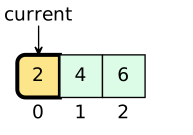
Text description
Array with 4 cells. From left to right: index 0: “2”, index 1: “4”, index 2: “6”, and an undisplayed cell.
index 0: “2” is highlighted.
Scene 2: Increment 2 to 3 and advance to the second element.
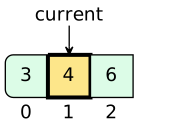
Text description
Array with 4 cells. From left to right: index 0: “3”, index 1: “4”, index 2: “6”, and an undisplayed cell.
index 1: “4” is highlighted.
Scene 3: Increment 4 to 5 and advance to the third element.
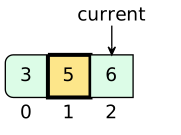
Text description
Array with 4 cells. From left to right: index 0: “3”, index 1: “5”, index 2: “6”, and an undisplayed cell.
index 1: “5” is highlighted.
Scene 4: Increment 6 to 7. The pointer is now at the end.
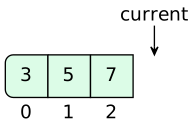
Text description
Array with 4 cells. From left to right: index 0: “3”, index 1: “5”, index 2: “7”, and an undisplayed cell.
Example 3: Min heap insertion
Ellipses identify the parent and child involved in each comparison or swap. The outline follows the node keys in each scene, including after they change positions. Highlighted nodes show the values exchanged in that step.
Source
.. tb-stack::
   :name: percolate-up
   :caption: Insert a new value into a min heap and restore the heap
             property.

   .. tb-scene::
      :caption: New element pushed onto heap

      If the new value is less than its parent, it must be moved into a valid
      position.

      .. tb-graph:: tree
         :style: tree
         :indicators: push=b
         :highlight: tree.node[b]

         root['a'] -left-> d['d']
         root -right-> c['c']
         d -left-> h['h']
         d -right-> e['e']
         h -left-> k['k']
         h -right-> i['i']
         e -left-> j['j']
         e -right-> b['b']
         c -left-> f['f']
         c -right-> g['g']


   .. tb-scene::
      :caption: Make the first move

      First we swap the value at position 'b' with the value at position 'e'.

      .. tb-graph:: tree
         :style: tree
         :highlight: tree.node[b] tree.node[e]
         :overlay: b e

         root['a'] -left-> d['d']
         root -right-> c['c']
         d -left-> h['h']
         d -right-> b['b']
         h -left-> k['k']
         h -right-> i['i']
         b -left-> j['j']
         b -right-> e['e']
         c -left-> f['f']
         c -right-> g['g']

   .. tb-scene::
      :caption: Make the next move

      The value at position 'd' is still larger than 'b', so we are not done.

      .. tb-graph:: tree
         :style: tree
         :highlight: tree.node[b] tree.node[d]
         :overlay: b d

         root['a'] -left-> b['b']
         root -right-> c['c']
         b -left-> h['h']
         b -right-> d['d']
         h -left-> k['k']
         h -right-> i['i']
         d -left-> j['j']
         d -right-> e['e']
         c -left-> f['f']
         c -right-> g['g']

   .. tb-scene::
      :caption: Percolate up is done

      Now that 'a' is less than 'b' and all of the children of 'b' are greater
      than 'b', the heap property has been restored and we are done.

      .. tb-graph:: tree
         :style: tree

         root['a'] -left-> b['b']
         root -right-> c['c']
         b -left-> h['h']
         b -right-> d['d']
         h -left-> k['k']
         h -right-> i['i']
         d -left-> j['j']
         d -right-> e['e']
         c -left-> f['f']
         c -right-> g['g']
Rendered
Insert a new value into a min heap and restore the heap property.
Scene 1: New element pushed onto heap
If the new value is less than its parent, it must be moved into a valid position.
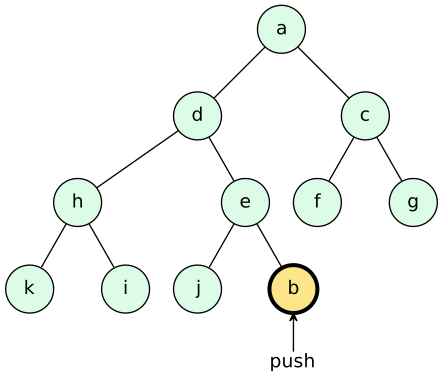
Text description
Tree diagram with 11 visible nodes.
The root is “a”.
“a” has left child “d” and right child “c”. “d” has left child “h” and right child “e”. “h” has left child “k” and right child “i”. “e” has left child “j” and right child “b”. “c” has left child “f” and right child “g”.
“k”, “i”, “j”, “b”, “f”, and “g” are leaves.
“b” is highlighted.
Indicator “push” points to “b”.
Scene 2: Make the first move
First we swap the value at position ‘b’ with the value at position ‘e’.
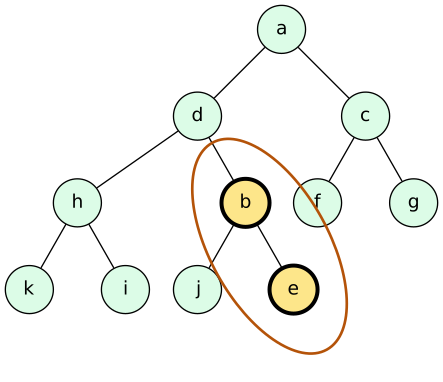
Text description
Tree diagram with 11 visible nodes.
The root is “a”.
“a” has left child “d” and right child “c”. “d” has left child “h” and right child “b”. “h” has left child “k” and right child “i”. “b” has left child “j” and right child “e”. “c” has left child “f” and right child “g”.
“k”, “i”, “j”, “e”, “f”, and “g” are leaves.
“b” and “e” are highlighted.
An ellipse surrounds “b” (node b) and “e” (node e).
Scene 3: Make the next move
The value at position ‘d’ is still larger than ‘b’, so we are not done.
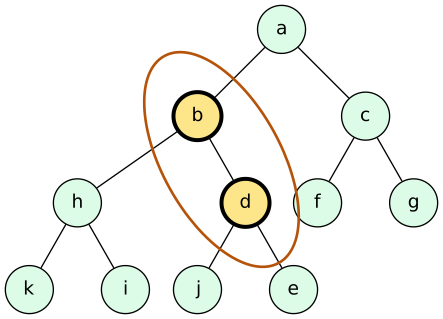
Text description
Tree diagram with 11 visible nodes.
The root is “a”.
“a” has left child “b” and right child “c”. “b” has left child “h” and right child “d”. “h” has left child “k” and right child “i”. “d” has left child “j” and right child “e”. “c” has left child “f” and right child “g”.
“k”, “i”, “j”, “e”, “f”, and “g” are leaves.
“b” and “d” are highlighted.
An ellipse surrounds “b” (node b) and “d” (node d).
Scene 4: Percolate up is done
Now that ‘a’ is less than ‘b’ and all of the children of ‘b’ are greater than ‘b’, the heap property has been restored and we are done.
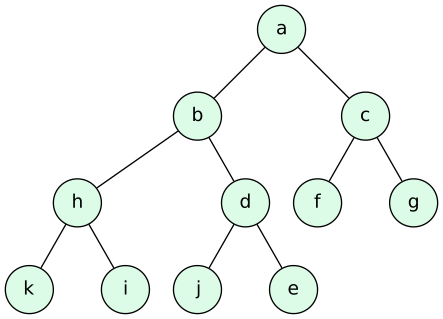
Text description
Tree diagram with 11 visible nodes.
The root is “a”.
“a” has left child “b” and right child “c”. “b” has left child “h” and right child “d”. “h” has left child “k” and right child “i”. “d” has left child “j” and right child “e”. “c” has left child “f” and right child “g”.
“k”, “i”, “j”, “e”, “f”, and “g” are leaves.
Example 4: Pre-order traversal
This example prints the tree in pre-order: the current value, then the left
subtree, then the right subtree. Each scene summarizes a meaningful step;
highlighted lines show its operations, and the pointer identifies the current
call’s node parameter. Scenes show every printed value and the returns to
callers that begin a right subtree.
Program output appears between the code and tree and retains everything printed
so far. The final print(root); line in the listing represents the caller.
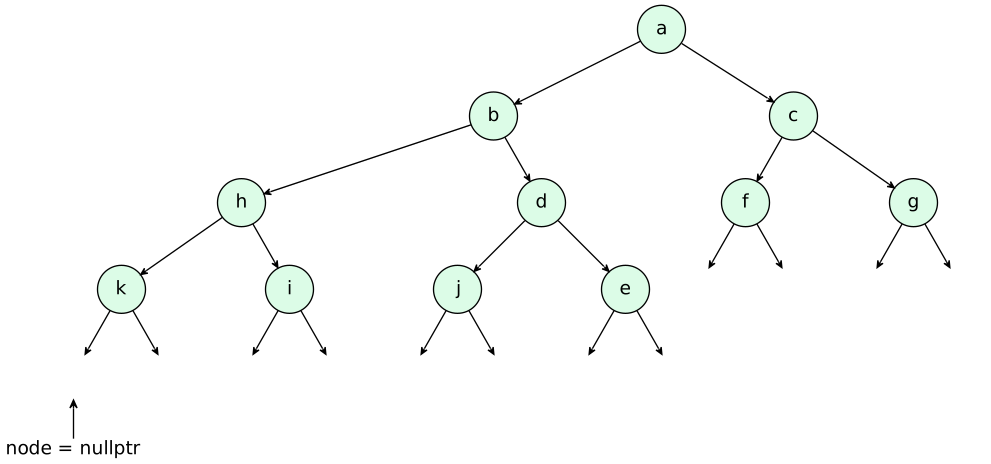
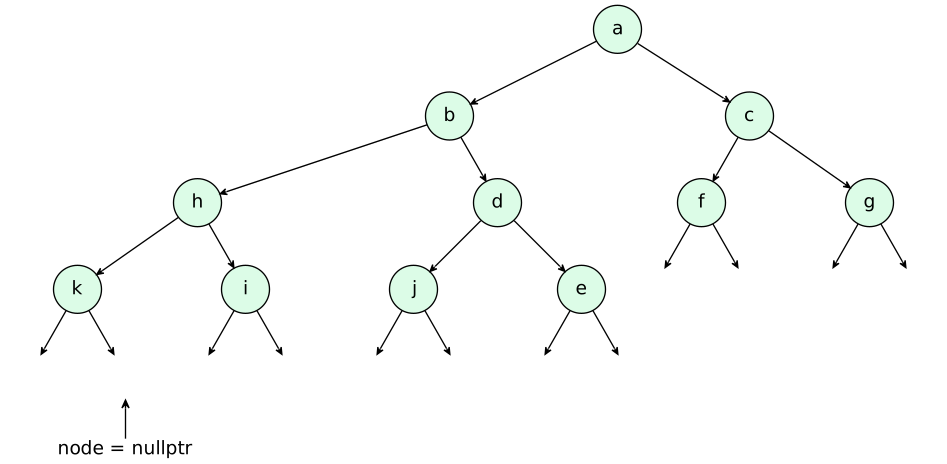
Every leaf has two null child pointers, drawn as arrows to {invisible}
endpoints. The two child calls for the first leaf, k, demonstrate the base case:
node = nullptr makes the condition true, and return; ends the call
without printing. Later scenes summarize these repeated base-case calls while
preserving the order of visits and accumulated output.
This example uses a named tree style with arrowheads. Add it to your existing
tb_graph_styles configuration in conf.py:
tb_graph_styles["print-tree"] = {"base": "tree", "arrows": "vee"}
Print every tree value using pre-order traversal
Scene 1: Call print(root)
Start at the root. Before advancing, predict which value prints first. Each call prints its own value before visiting either subtree.
 1template <class T>
 2void print(tree<T>* node) {
 3  if (node == nullptr) {
 4    return;
 5  }
 6  std::cout << node->value << ' ';
 7  print(node->left);
 8  print(node->right);
 9}
10
11print(root);
Program output
(empty)
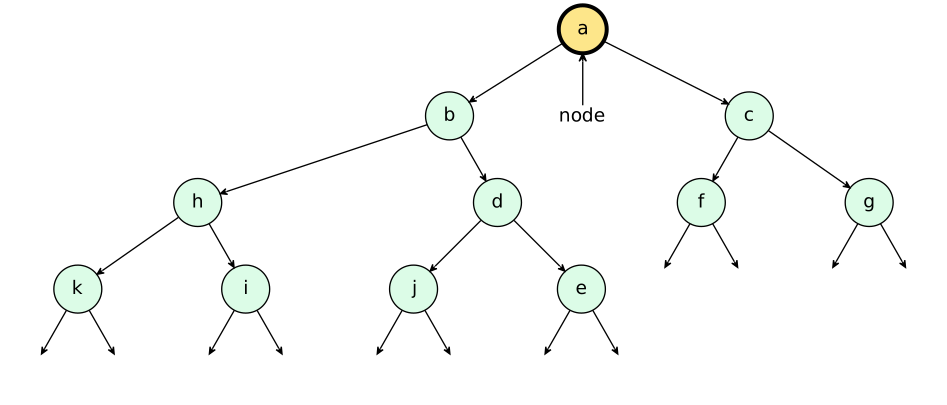
Text description
The root a has left subtree b(h(k, i), d(j, e)) and right subtree c(f, g). Each leaf has left and right null pointers, shown by arrows to invisible endpoints.
Scene 2: Visit a: print the root first
The root is not null, so print a. Then call print(node->left) to enter b; the entire left subtree must finish before the right subtree begins.
 1template <class T>
 2void print(tree<T>* node) {
 3  if (node == nullptr) {
 4    return;
 5  }
 6  std::cout << node->value << ' ';
 7  print(node->left);
 8  print(node->right);
 9}
10
11print(root);
Program output
a
Text description
The root a has left subtree b(h(k, i), d(j, e)) and right subtree c(f, g). Each leaf has left and right null pointers, shown by arrows to invisible endpoints.
Scene 3: Visit b: print before descending left
The call for b prints b, then enters its left child h. The call for a waits for this whole subtree to finish.
 1template <class T>
 2void print(tree<T>* node) {
 3  if (node == nullptr) {
 4    return;
 5  }
 6  std::cout << node->value << ' ';
 7  print(node->left);
 8  print(node->right);
 9}
10
11print(root);
Program output
a b
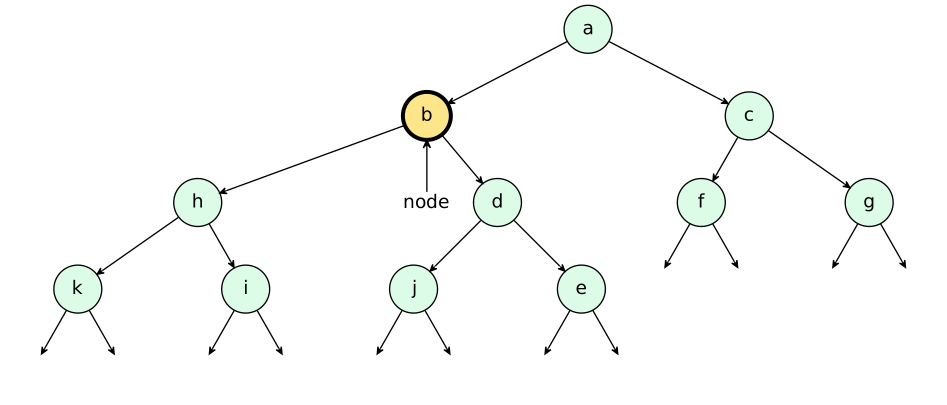
Text description
The root a has left subtree b(h(k, i), d(j, e)) and right subtree c(f, g). Each leaf has left and right null pointers, shown by arrows to invisible endpoints.
Scene 4: Visit h: continue down the left subtree
Print h, then enter its left child k. Each descent starts a new call with its own node parameter.
 1template <class T>
 2void print(tree<T>* node) {
 3  if (node == nullptr) {
 4    return;
 5  }
 6  std::cout << node->value << ' ';
 7  print(node->left);
 8  print(node->right);
 9}
10
11print(root);
Program output
a b h
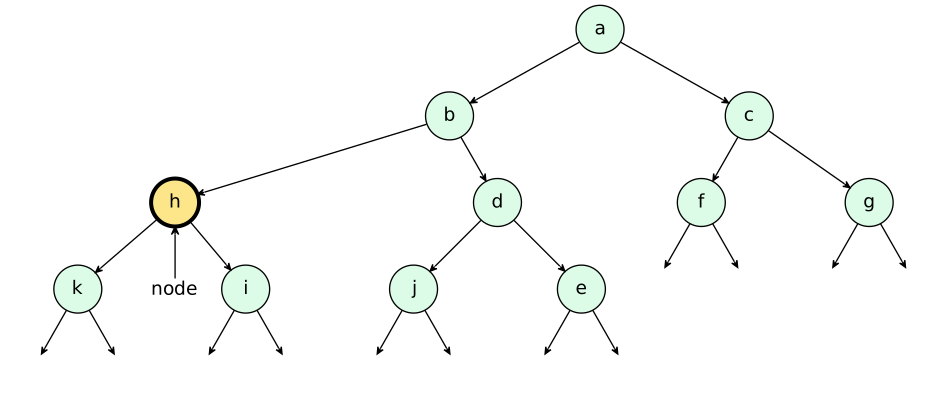
Text description
The root a has left subtree b(h(k, i), d(j, e)) and right subtree c(f, g). Each leaf has left and right null pointers, shown by arrows to invisible endpoints.
Scene 5: Visit k: a leaf still makes two child calls
Print k. Both child pointers are null; the next two scenes show how the base case ends those calls without printing another value.
 1template <class T>
 2void print(tree<T>* node) {
 3  if (node == nullptr) {
 4    return;
 5  }
 6  std::cout << node->value << ' ';
 7  print(node->left);
 8  print(node->right);
 9}
10
11print(root);
Program output
a b h k
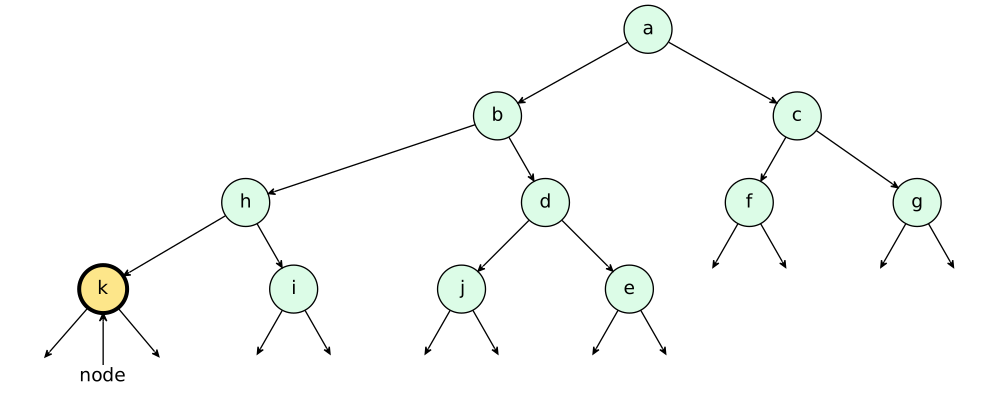
Text description
The root a has left subtree b(h(k, i), d(j, e)) and right subtree c(f, g). Each leaf has left and right null pointers, shown by arrows to invisible endpoints.
Scene 6: Check k.left and return from print(nullptr)
The left-child call receives nullptr. The condition is true, so return immediately without printing or making further recursive calls. Execution resumes in the call for k.
 1template <class T>
 2void print(tree<T>* node) {
 3  if (node == nullptr) {
 4    return;
 5  }
 6  std::cout << node->value << ' ';
 7  print(node->left);
 8  print(node->right);
 9}
10
11print(root);
Program output
a b h k
Text description
The root a has left subtree b(h(k, i), d(j, e)) and right subtree c(f, g). Each leaf has left and right null pointers, shown by arrows to invisible endpoints.
Scene 7: Check k.right and return from print(nullptr)
The call for k now calls print(node->right). Its argument is also nullptr, so the same base case returns without printing. Both child calls are complete, so print(k) finishes.
 1template <class T>
 2void print(tree<T>* node) {
 3  if (node == nullptr) {
 4    return;
 5  }
 6  std::cout << node->value << ' ';
 7  print(node->left);
 8  print(node->right);
 9}
10
11print(root);
Program output
a b h k
Text description
The root a has left subtree b(h(k, i), d(j, e)) and right subtree c(f, g). Each leaf has left and right null pointers, shown by arrows to invisible endpoints.
Scene 8: Resume h and enter its right subtree
After print(k) returns, node is h again. Its left subtree is complete, so call print(node->right) to enter i. Predict the next printed value before advancing.
 1template <class T>
 2void print(tree<T>* node) {
 3  if (node == nullptr) {
 4    return;
 5  }
 6  std::cout << node->value << ' ';
 7  print(node->left);
 8  print(node->right);
 9}
10
11print(root);
Program output
a b h k
Text description
The root a has left subtree b(h(k, i), d(j, e)) and right subtree c(f, g). Each leaf has left and right null pointers, shown by arrows to invisible endpoints.
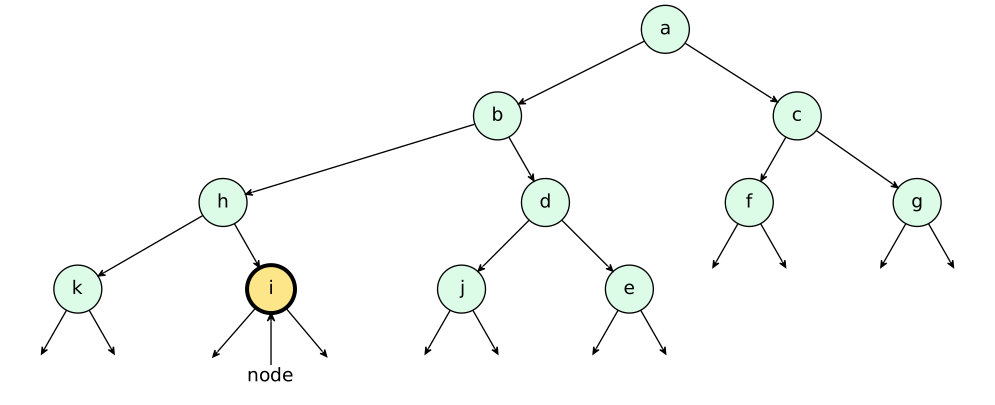
Scene 9: Visit i: finish the right subtree of h
Print i. As with k, both null-child calls return without printing; their repeated base-case steps are combined here. The call for i finishes, followed by the call for h.
 1template <class T>
 2void print(tree<T>* node) {
 3  if (node == nullptr) {
 4    return;
 5  }
 6  std::cout << node->value << ' ';
 7  print(node->left);
 8  print(node->right);
 9}
10
11print(root);
Program output
a b h k i
Text description
The root a has left subtree b(h(k, i), d(j, e)) and right subtree c(f, g). Each leaf has left and right null pointers, shown by arrows to invisible endpoints.
Scene 10: Resume b and enter its right subtree
The entire subtree rooted at h is complete. Execution resumes with node equal to b, and print(node->right) enters d.
 1template <class T>
 2void print(tree<T>* node) {
 3  if (node == nullptr) {
 4    return;
 5  }
 6  std::cout << node->value << ' ';
 7  print(node->left);
 8  print(node->right);
 9}
10
11print(root);
Program output
a b h k i
Text description
The root a has left subtree b(h(k, i), d(j, e)) and right subtree c(f, g). Each leaf has left and right null pointers, shown by arrows to invisible endpoints.
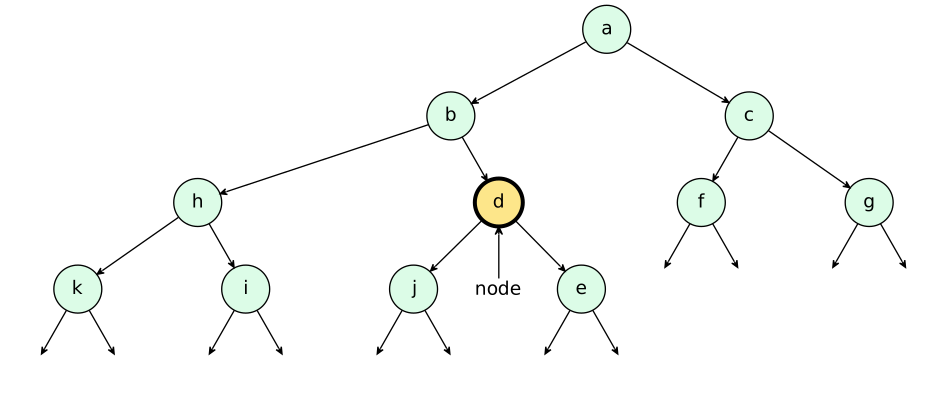
Scene 11: Visit d: print before descending left
Print d, then enter its left child j. The right child e must wait until the call for j finishes.
 1template <class T>
 2void print(tree<T>* node) {
 3  if (node == nullptr) {
 4    return;
 5  }
 6  std::cout << node->value << ' ';
 7  print(node->left);
 8  print(node->right);
 9}
10
11print(root);
Program output
a b h k i d
Text description
The root a has left subtree b(h(k, i), d(j, e)) and right subtree c(f, g). Each leaf has left and right null pointers, shown by arrows to invisible endpoints.
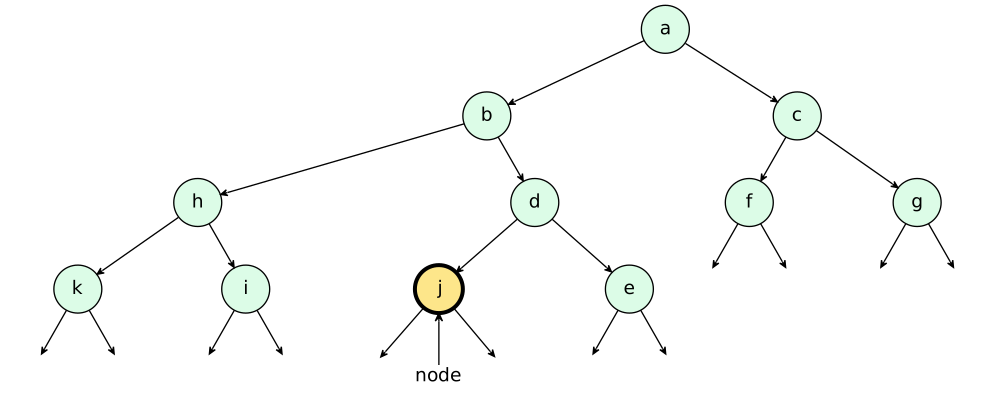
Scene 12: Visit j: finish the left subtree of d
Print j. Its two null-child calls return without printing, and print(j) finishes. These are the same base-case steps already shown for k.
 1template <class T>
 2void print(tree<T>* node) {
 3  if (node == nullptr) {
 4    return;
 5  }
 6  std::cout << node->value << ' ';
 7  print(node->left);
 8  print(node->right);
 9}
10
11print(root);
Program output
a b h k i d j
Text description
The root a has left subtree b(h(k, i), d(j, e)) and right subtree c(f, g). Each leaf has left and right null pointers, shown by arrows to invisible endpoints.
Scene 13: Resume d and enter its right subtree
After print(j) returns, node is d again. Call print(node->right) to enter e.
 1template <class T>
 2void print(tree<T>* node) {
 3  if (node == nullptr) {
 4    return;
 5  }
 6  std::cout << node->value << ' ';
 7  print(node->left);
 8  print(node->right);
 9}
10
11print(root);
Program output
a b h k i d j
Text description
The root a has left subtree b(h(k, i), d(j, e)) and right subtree c(f, g). Each leaf has left and right null pointers, shown by arrows to invisible endpoints.
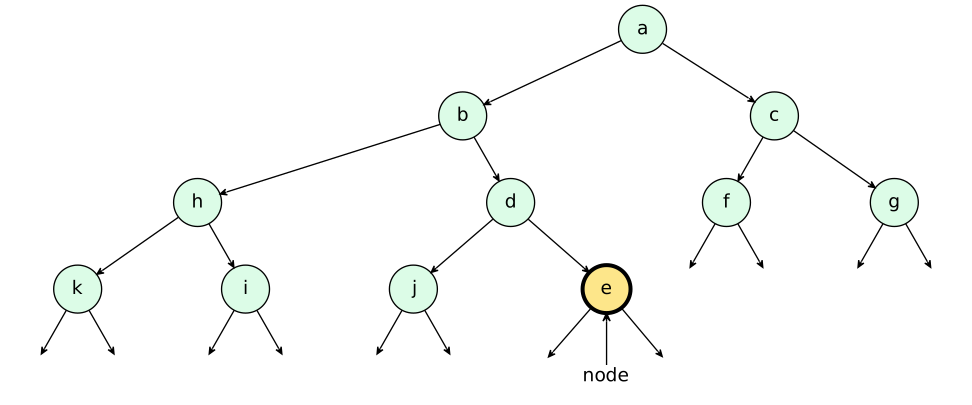
Scene 14: Visit e: complete the subtree rooted at b
Print e. Both null-child calls return without printing. The completed calls then return from e to d, from d to b, and from b to a.
 1template <class T>
 2void print(tree<T>* node) {
 3  if (node == nullptr) {
 4    return;
 5  }
 6  std::cout << node->value << ' ';
 7  print(node->left);
 8  print(node->right);
 9}
10
11print(root);
Program output
a b h k i d j e
Text description
The root a has left subtree b(h(k, i), d(j, e)) and right subtree c(f, g). Each leaf has left and right null pointers, shown by arrows to invisible endpoints.
Scene 15: Resume a and enter its right subtree
The whole left subtree of a is complete. Execution resumes with node equal to a, and print(node->right) enters c. No ancestor is printed again when its call resumes.
 1template <class T>
 2void print(tree<T>* node) {
 3  if (node == nullptr) {
 4    return;
 5  }
 6  std::cout << node->value << ' ';
 7  print(node->left);
 8  print(node->right);
 9}
10
11print(root);
Program output
a b h k i d j e
Text description
The root a has left subtree b(h(k, i), d(j, e)) and right subtree c(f, g). Each leaf has left and right null pointers, shown by arrows to invisible endpoints.
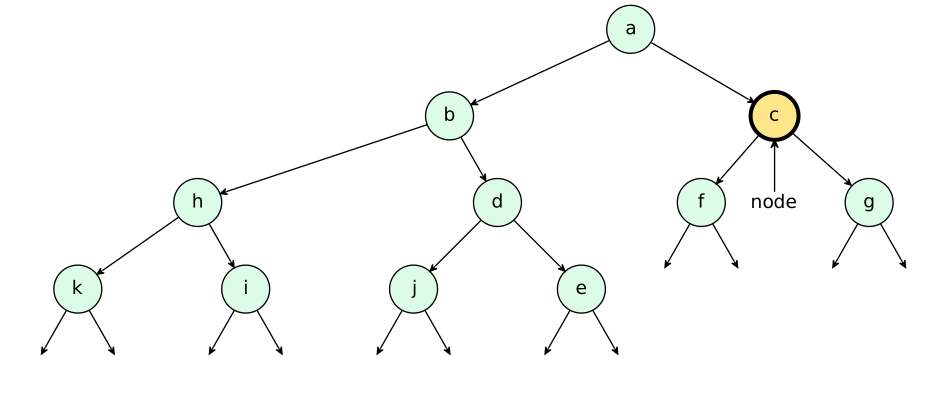
Scene 16: Visit c: print before descending left
Print c, then enter its left child f. The right subtree follows only after f finishes.
 1template <class T>
 2void print(tree<T>* node) {
 3  if (node == nullptr) {
 4    return;
 5  }
 6  std::cout << node->value << ' ';
 7  print(node->left);
 8  print(node->right);
 9}
10
11print(root);
Program output
a b h k i d j e c
Text description
The root a has left subtree b(h(k, i), d(j, e)) and right subtree c(f, g). Each leaf has left and right null pointers, shown by arrows to invisible endpoints.
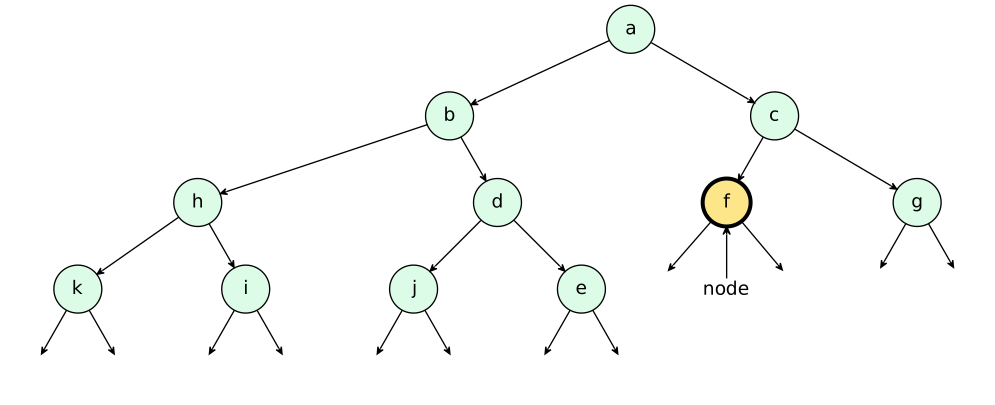
Scene 17: Visit f: finish the left subtree of c
Print f. Both null-child calls return without printing, and print(f) finishes.
 1template <class T>
 2void print(tree<T>* node) {
 3  if (node == nullptr) {
 4    return;
 5  }
 6  std::cout << node->value << ' ';
 7  print(node->left);
 8  print(node->right);
 9}
10
11print(root);
Program output
a b h k i d j e c f
Text description
The root a has left subtree b(h(k, i), d(j, e)) and right subtree c(f, g). Each leaf has left and right null pointers, shown by arrows to invisible endpoints.
Scene 18: Resume c and enter its right subtree
After print(f) returns, node is c again. Call print(node->right) to enter g.
 1template <class T>
 2void print(tree<T>* node) {
 3  if (node == nullptr) {
 4    return;
 5  }
 6  std::cout << node->value << ' ';
 7  print(node->left);
 8  print(node->right);
 9}
10
11print(root);
Program output
a b h k i d j e c f
Text description
The root a has left subtree b(h(k, i), d(j, e)) and right subtree c(f, g). Each leaf has left and right null pointers, shown by arrows to invisible endpoints.
Scene 19: Visit g: print the last value
Print g. Its two null-child calls return without printing. All tree values have now appeared in pre-order.
 1template <class T>
 2void print(tree<T>* node) {
 3  if (node == nullptr) {
 4    return;
 5  }
 6  std::cout << node->value << ' ';
 7  print(node->left);
 8  print(node->right);
 9}
10
11print(root);
Program output
a b h k i d j e c f g
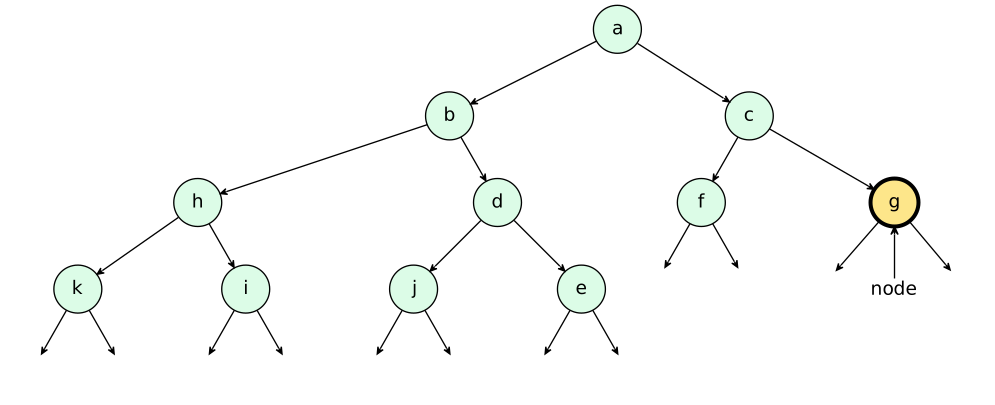
Text description
The root a has left subtree b(h(k, i), d(j, e)) and right subtree c(f, g). Each leaf has left and right null pointers, shown by arrows to invisible endpoints.
Scene 20: Return to the caller: traversal is complete
The calls return from g to c and then to a. The call for a finishes and returns to the caller of print(root). The output contains each value once: the root, its complete left subtree, then its complete right subtree.
 1template <class T>
 2void print(tree<T>* node) {
 3  if (node == nullptr) {
 4    return;
 5  }
 6  std::cout << node->value << ' ';
 7  print(node->left);
 8  print(node->right);
 9}
10
11print(root);
Program output
a b h k i d j e c f g
Text description
The root a has left subtree b(h(k, i), d(j, e)) and right subtree c(f, g). Each leaf has left and right null pointers, shown by arrows to invisible endpoints.